Creating professional-quality digital content has never been more important. Whether you’re managing a business, running a blog, growing a YouTube channel, or building a personal brand, producing eye-catching visuals consistently can be challenging without the right tools.
Fortunately, artificial intelligence has transformed the creative process. Instead of spending hours designing graphics from scratch, AI-powered platforms can now generate social media posts, marketing materials, presentations, videos, and promotional graphics within minutes.
Among the most recognized solutions available today is Adobe Express, Adobe’s cloud-based creative platform designed to simplify graphic design while integrating powerful AI features. Unlike traditional Adobe applications such as Photoshop or Illustrator, Adobe Express focuses on speed, accessibility, and ease of use, making professional design available to users of all skill levels.
With continuous updates, Firefly AI integration, intelligent editing tools, and thousands of professionally designed templates, Adobe Express has become one of the strongest competitors in the AI-powered design software market.
But is it truly worth using in 2026?
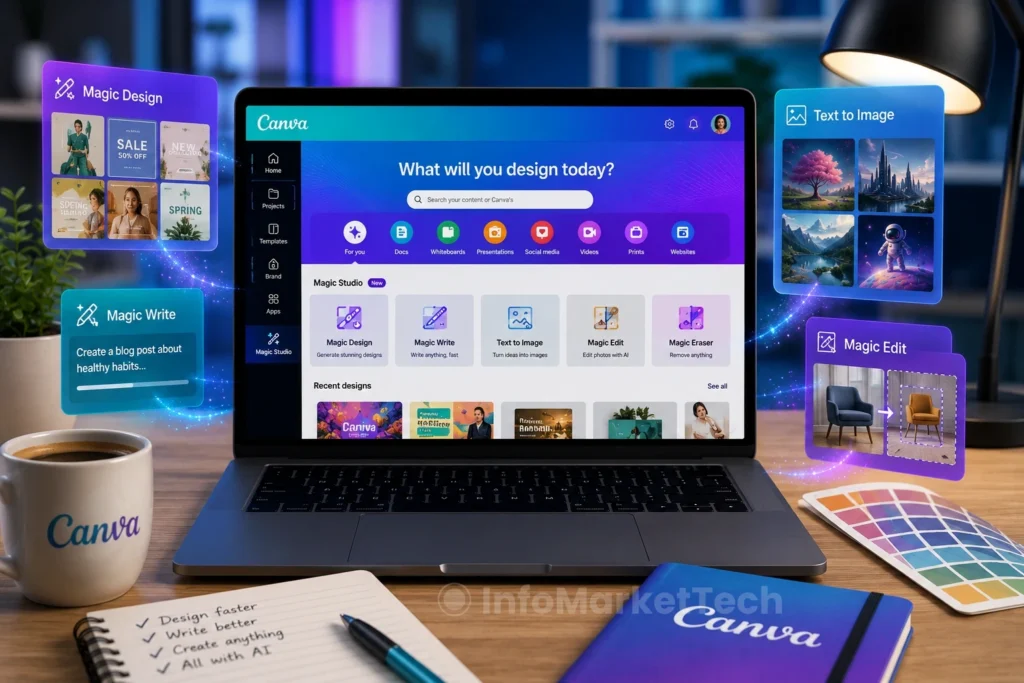
In this comprehensive review, we’ll examine Adobe Express’ features, pricing, usability, AI capabilities, strengths, weaknesses, and how it compares with competing platforms like Canva Magic Studio and Microsoft Designer.
By the end of this review, you’ll know whether Adobe Express deserves a place in your creative workflow.
What Is Adobe Express?
Adobe Express is an all-in-one cloud-based creative platform developed by Adobe to help users create high-quality digital content quickly and efficiently.
Unlike Adobe Photoshop, which requires advanced editing knowledge, Adobe Express is designed for speed and simplicity. It combines drag-and-drop editing, professionally designed templates, artificial intelligence, stock assets, and collaboration tools into a single web-based application accessible from virtually any device.
The platform supports a wide variety of creative projects, including:
- Social media graphics
- Instagram Stories
- Facebook ads
- YouTube thumbnails
- Flyers
- Posters
- Presentations
- Logos
- Marketing materials
- Short-form videos
- Promotional animations
- Business documents
- Brand kits
- AI-generated images
Because Adobe Express operates entirely in the cloud, users can begin a project on a desktop computer and continue editing from a tablet or smartphone without losing progress.
This flexibility makes it particularly attractive to freelancers, marketers, entrepreneurs, educators, and content creators who need professional designs without investing significant time learning traditional graphic design software.
Why Adobe Express Has Become So Popular
Several factors have contributed to Adobe Express’ rapid growth over the past few years.
First, Adobe recognized that many users wanted professional-looking designs without the complexity of Photoshop or Illustrator. Instead of targeting experienced graphic designers, Adobe Express focuses on everyday creators who need speed, convenience, and polished results.
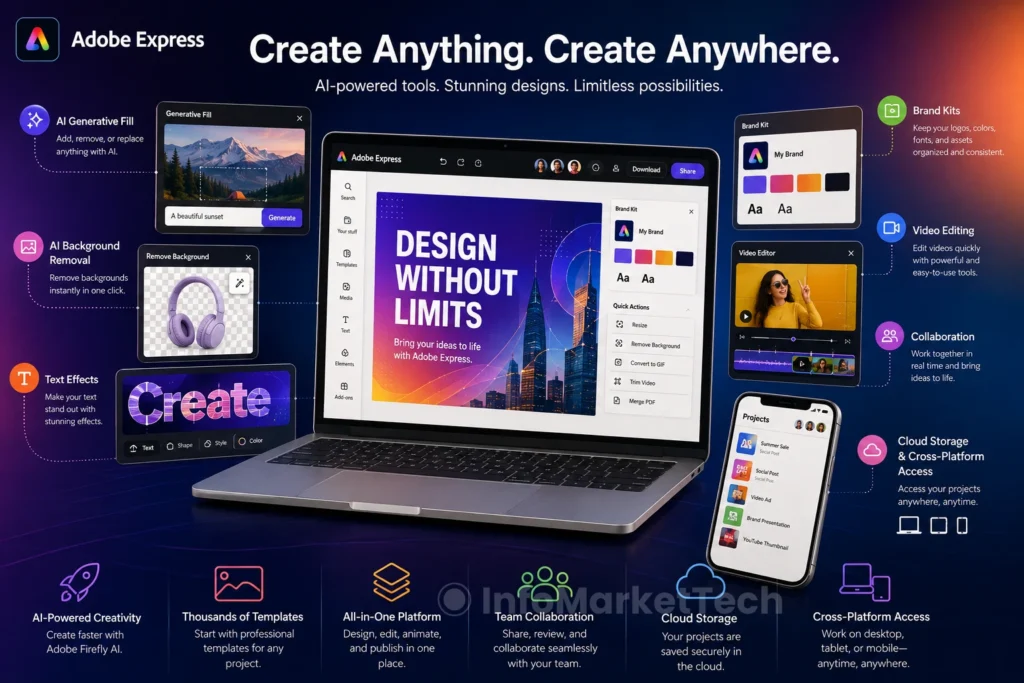
Another major advantage is the integration of Adobe Firefly, Adobe’s generative AI engine. Firefly enables users to create original images, remove unwanted objects, generate text effects, expand backgrounds, and automate repetitive editing tasks using simple text prompts.
Combined with Adobe’s extensive collection of fonts, stock photography, icons, templates, and creative assets, Adobe Express provides a complete ecosystem for producing high-quality content in a fraction of the time required by traditional design software.
For businesses and marketing teams, these productivity gains can translate into faster campaign launches, more consistent branding, and reduced design costs.
Key Features of Adobe Express
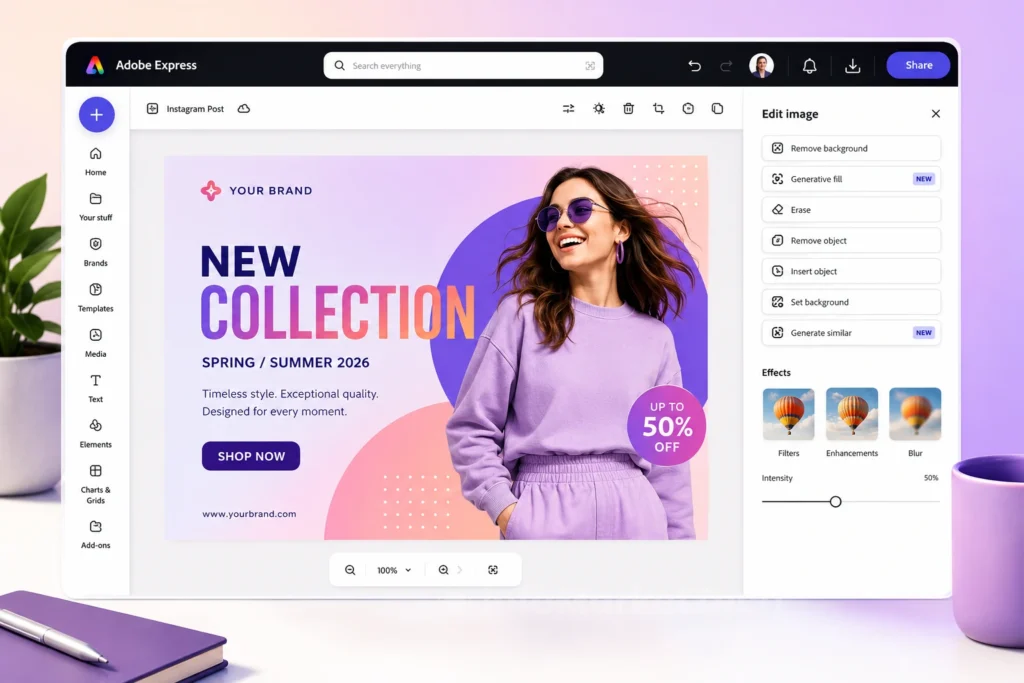
Adobe Express has evolved into a comprehensive AI-powered creative platform that enables users to design, edit, and publish professional content from virtually any device. Below are the features that make it one of the leading design applications in 2026.
AI-Powered Templates
One of Adobe Express’ biggest strengths is its extensive collection of professionally designed templates.
Instead of beginning with a blank canvas, users can choose from thousands of layouts for virtually every type of content imaginable, including:
- Instagram Posts
- Instagram Stories
- Facebook Ads
- TikTok Videos
- YouTube Thumbnails
- Pinterest Pins
- Flyers
- Posters
- Brochures
- Business Cards
- Email Headers
- Invitations
- Presentations
The AI recommendation engine suggests templates based on your project, helping you find the perfect design much faster. For beginners, this dramatically reduces the time needed to produce professional-looking graphics.
Adobe Firefly AI Integration
Perhaps the most exciting feature of Adobe Express is its integration with Adobe Firefly, Adobe’s generative artificial intelligence engine.
Instead of manually editing every element, users can simply describe what they want using natural language.
Firefly can:
- Generate original AI artwork
- Expand image backgrounds
- Replace objects
- Remove distractions
- Create realistic visual effects
- Generate artistic text styles
- Produce unique marketing graphics
The quality of Firefly’s image generation has improved significantly, making it one of the strongest AI image generators available today. For marketers and bloggers, this means producing custom illustrations without relying entirely on stock photography.
Text to Image
Adobe Express allows users to transform simple text prompts into original AI-generated images within seconds.
Simply describe the image you need, such as:
“Modern smart home with futuristic lighting and AI-powered devices.”
Within moments, Adobe Firefly generates multiple unique variations that can be edited further inside Adobe Express.
This feature is especially valuable for:
- Blog featured images
- Website illustrations
- Product concepts
- Social media graphics
- Marketing campaigns
- Digital advertising
Instead of spending hours searching stock image websites, creators can generate visuals tailored specifically to their projects.
AI Background Removal
Removing backgrounds used to require Photoshop expertise.
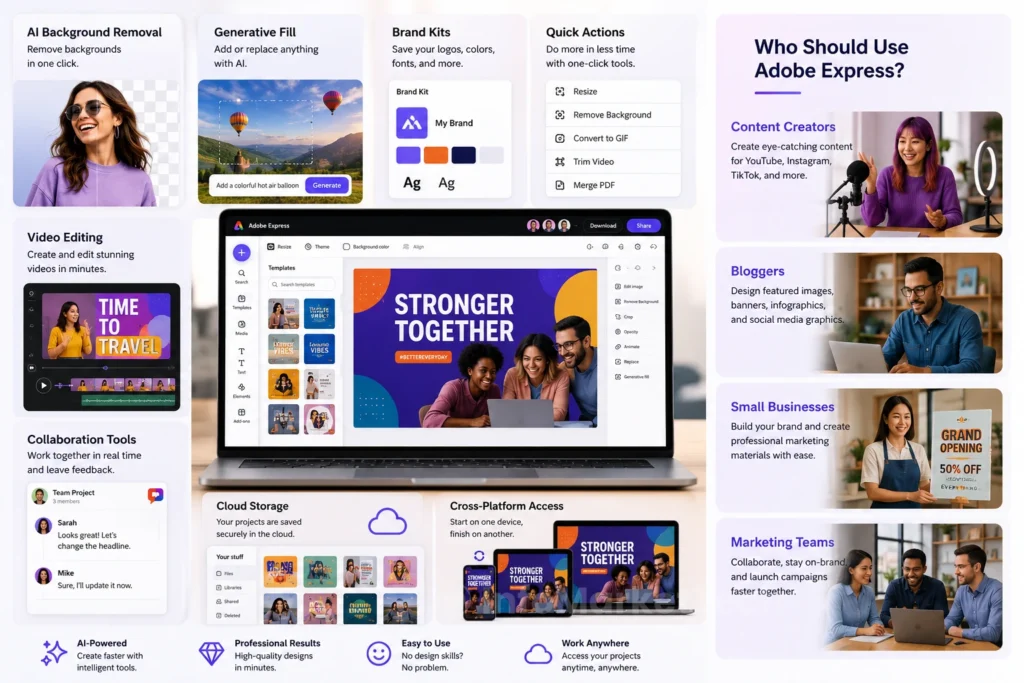
Adobe Express simplifies this task with one-click AI background removal.
The software automatically detects the primary subject and cleanly removes the surrounding background, making it ideal for:
- Product photography
- E-commerce listings
- Marketing materials
- Professional headshots
- Social media graphics
The results are impressively accurate in most situations, requiring very little manual cleanup.
Generative Fill
Another standout AI feature is Generative Fill.
Users can select any portion of an image and instruct Adobe Express to replace, expand, or modify it using text prompts.
For example:
- Replace a cloudy sky with a sunset.
- Add decorative objects.
- Extend backgrounds.
- Remove distracting elements.
- Change scenery.
This dramatically reduces editing time compared to traditional manual retouching.
Brand Kits
Businesses and content creators often struggle to maintain visual consistency.
Adobe Express solves this problem with Brand Kits, allowing users to store:
- Logos
- Brand colors
- Fonts
- Graphics
- Templates
Once configured, every new design automatically follows your brand guidelines.
This is particularly useful for agencies, entrepreneurs, bloggers, and companies publishing content regularly.
Quick Actions
Adobe Express includes dozens of productivity-focused Quick Actions that automate common editing tasks.
Popular examples include:
- Resize images
- Convert file formats
- Merge PDFs
- Trim videos
- Convert videos to GIFs
- Remove backgrounds
- Crop photos
- Reverse videos
- Convert image formats
These tools eliminate the need for multiple standalone applications.
Video Editing
Adobe Express has expanded well beyond static graphics.
Users can now create professional videos for:
- TikTok
- Instagram Reels
- YouTube Shorts
- Business presentations
The editor supports:
- Music
- Voiceovers
- Text animations
- Transitions
- Video trimming
- Motion graphics
- AI-powered enhancements
Although it doesn’t replace Adobe Premiere Pro for advanced productions, it’s more than capable of handling everyday marketing videos.
Collaboration Tools
Modern creative projects often involve multiple team members.
Adobe Express includes collaboration features that allow teams to:
- Share projects
- Leave comments
- Edit together
- Review changes
- Maintain brand consistency
These tools make it easier for businesses and agencies to streamline their creative workflows without constantly exchanging files.
Cloud Storage and Cross-Platform Access
Since Adobe Express is cloud-based, every project is automatically saved online.
Users can begin designing on a desktop computer, continue editing on a tablet, and make final adjustments using a smartphone.
This flexibility makes Adobe Express particularly attractive for professionals who work remotely or frequently switch between devices.
User Interface and Ease of Use
Adobe Express strikes an impressive balance between professional functionality and simplicity.
The interface is clean, intuitive, and thoughtfully organized, allowing users to locate templates, AI tools, and editing options with minimal effort.
Unlike traditional Adobe applications, Adobe Express avoids overwhelming new users with dozens of advanced menus and technical controls.
Instead, the platform emphasizes speed, drag-and-drop editing, and guided workflows that help users create polished designs quickly.
Even individuals with no prior graphic design experience can produce high-quality marketing materials within minutes.
Who Should Use Adobe Express?
One of Adobe Express’ greatest advantages is its versatility. Whether you’re an individual creator or part of a large organization, the platform offers tools that adapt to different creative needs.
Let’s take a closer look at the users who can benefit the most from Adobe Express.
Content Creators
Content creators constantly need fresh visuals to keep their audiences engaged.
Adobe Express allows creators to produce:
- YouTube thumbnails
- Instagram posts
- TikTok videos
- Facebook graphics
- Pinterest Pins
- Promotional banners
- Blog featured images
Instead of switching between multiple software applications, creators can manage nearly every stage of the design process within a single platform.
The AI-powered tools also accelerate repetitive tasks, allowing creators to spend more time producing valuable content rather than editing graphics.
Bloggers
For bloggers, Adobe Express serves as a complete visual content creation platform.
Blog owners can quickly design:
- Featured images
- Infographics
- Call-to-action banners
- Email graphics
- Promotional social media posts
- Website graphics
The integration of Adobe Firefly makes it easy to generate original illustrations that help articles stand out while reducing reliance on generic stock photos.
For websites publishing content regularly, Adobe Express can significantly improve workflow efficiency.
Small Businesses
Small businesses often operate without dedicated graphic designers.
Adobe Express provides an affordable solution for creating professional marketing materials without hiring an agency.
Business owners can easily produce:
- Product promotions
- Flyers
- Menus
- Business cards
- Promotional videos
- Social media campaigns
- Seasonal advertisements
Brand Kits ensure that every design maintains consistent colors, fonts, and logos across all marketing materials.
This consistency strengthens brand recognition while saving valuable time.
Marketing Teams
Marketing professionals manage multiple campaigns across various platforms every day.
Adobe Express helps streamline those responsibilities by providing:
- Team collaboration
- Shared brand assets
- Campaign templates
- AI-assisted content creation
- Social media scheduling
- Fast content repurposing
Instead of recreating designs for every platform, marketers can quickly resize and adapt existing projects using Adobe’s intelligent editing tools.
Students
Students frequently create presentations, posters, research projects, and educational content.
Adobe Express simplifies these tasks through professionally designed templates and AI-assisted editing tools. Even users with no graphic design experience can produce polished academic projects suitable for classrooms, universities, and online learning environments.
Educators
Teachers and instructors also benefit from Adobe Express.
Educational materials such as:
- Lesson presentations
- Classroom posters
- Worksheets
- Certificates
- Learning infographics
- Interactive assignments
All these can be created within minutes. The platform encourages creativity while reducing preparation time for educators managing multiple classes.
Performance and User Experience
Adobe Express delivers a smooth and responsive experience across desktop browsers, tablets, and mobile devices.
Projects load quickly, editing tools respond efficiently, and AI-powered features typically generate results within seconds.
Navigation is intuitive, making it easy for beginners to locate templates, editing options, and AI tools without feeling overwhelmed.
Adobe’s clean interface maintains the professional quality expected from its Creative Cloud ecosystem while remaining significantly easier to learn than Photoshop or Illustrator.
Overall performance is excellent for everyday design tasks, marketing projects, and content creation.
Adobe Express Pricing
Adobe Express offers flexible pricing options suitable for both casual users and professionals.
Adobe Express Free
The free version provides access to thousands of templates, basic editing tools, limited AI credits, Adobe Stock assets, and cloud storage.
It’s an excellent starting point for students, hobbyists, and anyone wanting to explore the platform.
Adobe Express Premium
The Premium subscription unlocks the platform’s full potential.
Subscribers gain access to:
- Unlimited premium templates
- Advanced Adobe Firefly AI features
- Premium Adobe Fonts
- Millions of Adobe Stock assets
- Brand Kits
- Advanced collaboration tools
- Expanded cloud storage
- Premium video editing features
For professionals who create content regularly, Premium offers excellent value.
Adobe Express for Teams
Designed for businesses and organizations, the Teams plan includes centralized brand management, collaborative editing, user permissions, shared libraries, and administrative controls.
It is particularly useful for agencies, marketing departments, and companies managing multiple designers.
Adobe Express vs. Canva Magic Studio
Adobe Express and Canva Magic Studio are currently two of the strongest competitors in AI-powered design software.
Adobe Express excels in Adobe ecosystem integration, advanced Firefly AI capabilities, and professional creative assets.
Canva Magic Studio, on the other hand, offers a larger collection of ready-made templates and a slightly easier learning curve for complete beginners.
Users already invested in Adobe products will likely appreciate Adobe Express, while newcomers looking for maximum simplicity may prefer Canva.
Both platforms are excellent, and the better choice ultimately depends on individual workflow and creative requirements.
Pros and Cons of Adobe Express
Like any creative software, Adobe Express has strengths and weaknesses. Understanding both sides will help you determine whether it fits your specific workflow and content creation needs.
Pros
Beginner-Friendly Interface
One of Adobe Express’ biggest advantages is its intuitive design.
Unlike Photoshop or Illustrator, Adobe Express doesn’t overwhelm users with hundreds of tools and complicated menus. Most features are clearly organized, allowing beginners to create professional-looking graphics within minutes.
Excellent AI Features
Adobe Firefly has become one of the most powerful AI engines available for creative work.
Users can generate images, expand backgrounds, remove objects, apply text effects, and automate repetitive editing tasks with impressive accuracy.
These AI capabilities significantly reduce design time while increasing creative possibilities.
Huge Template Library
Adobe Express offers thousands of professionally designed templates covering nearly every type of digital content. Whether you’re creating social media graphics, YouTube thumbnails, presentations, business flyers, posters, or advertisements, chances are you’ll find an excellent starting point.
Cross-Platform Flexibility
Because Adobe Express is cloud-based, users can access projects from desktops, tablets, and smartphones without worrying about manual file transfers.
Automatic cloud synchronization makes remote work much easier.
Great for Businesses
Brand Kits, team collaboration, shared libraries, and marketing templates make Adobe Express particularly attractive for companies managing multiple campaigns.
Businesses can maintain consistent branding across all marketing materials while improving productivity.
Cons
Premium Features Require a Subscription
Although the free version is generous, many advanced AI capabilities, premium templates, Adobe Stock assets, and collaboration tools require a Premium subscription.
Professional users will likely need the paid plan to unlock the software’s full potential.
Less Powerful Than Photoshop
Adobe Express prioritizes speed and simplicity over advanced editing.
Professional designers who require pixel-level precision, advanced masking, or complex photo manipulation will still need Photoshop.
Adobe Express complements Photoshop rather than replacing it.
AI Credit Limitations
Some AI-powered features rely on monthly generative credits.
Heavy users who frequently generate AI images or perform advanced edits may eventually reach those limits depending on their subscription plan.
Internet Connection Required
Since Adobe Express operates primarily in the cloud, a stable internet connection is necessary for most AI features and project synchronization.
Offline functionality remains limited compared to traditional desktop software.
Is Adobe Express Worth It in 2026?
For most users, the answer is yes.
Adobe Express successfully combines professional design quality with beginner-friendly usability, making it one of the most versatile creative platforms available today.
Its AI-powered tools dramatically reduce the time needed to produce high-quality graphics, while Adobe Firefly continues to improve with every update.
Whether you’re designing social media posts, blog graphics, promotional videos, presentations, or marketing campaigns, Adobe Express provides an efficient all-in-one solution.
The software is particularly valuable for:
- Content creators
- Bloggers
- Small business owners
- Marketing professionals
- Students
- Educators
- Freelancers
- Social media managers
While advanced graphic designers may still rely on Photoshop or Illustrator for specialized work, Adobe Express covers the vast majority of everyday creative tasks with remarkable speed and ease.
Final Verdict
Adobe Express has evolved far beyond a simple online design tool.
Thanks to Adobe Firefly AI, intelligent editing features, thousands of templates, cloud collaboration, and seamless Creative Cloud integration, it has become one of the strongest AI-powered design platforms available in 2026.
Its intuitive interface makes professional-quality design accessible to beginners, while its growing collection of advanced AI features continues to satisfy experienced creators looking for greater efficiency.
If your goal is to produce eye-catching graphics, marketing materials, presentations, videos, and social media content without spending countless hours learning complex design software, Adobe Express is an outstanding investment.
Overall Rating
⭐⭐⭐⭐⭐ 4.8 / 5
Ease of Use: ⭐⭐⭐⭐⭐
AI Features: ⭐⭐⭐⭐⭐
Templates: ⭐⭐⭐⭐⭐
Performance: ⭐⭐⭐⭐⭐
Value for Money: ⭐⭐⭐⭐☆
Overall Recommendation: Highly Recommended for content creators, bloggers, marketers, educators, entrepreneurs, and businesses looking for a fast, professional, AI-powered design solution.